
Launching my first Apple Watch app
4 min readSwelter Is Now on Apple Watch
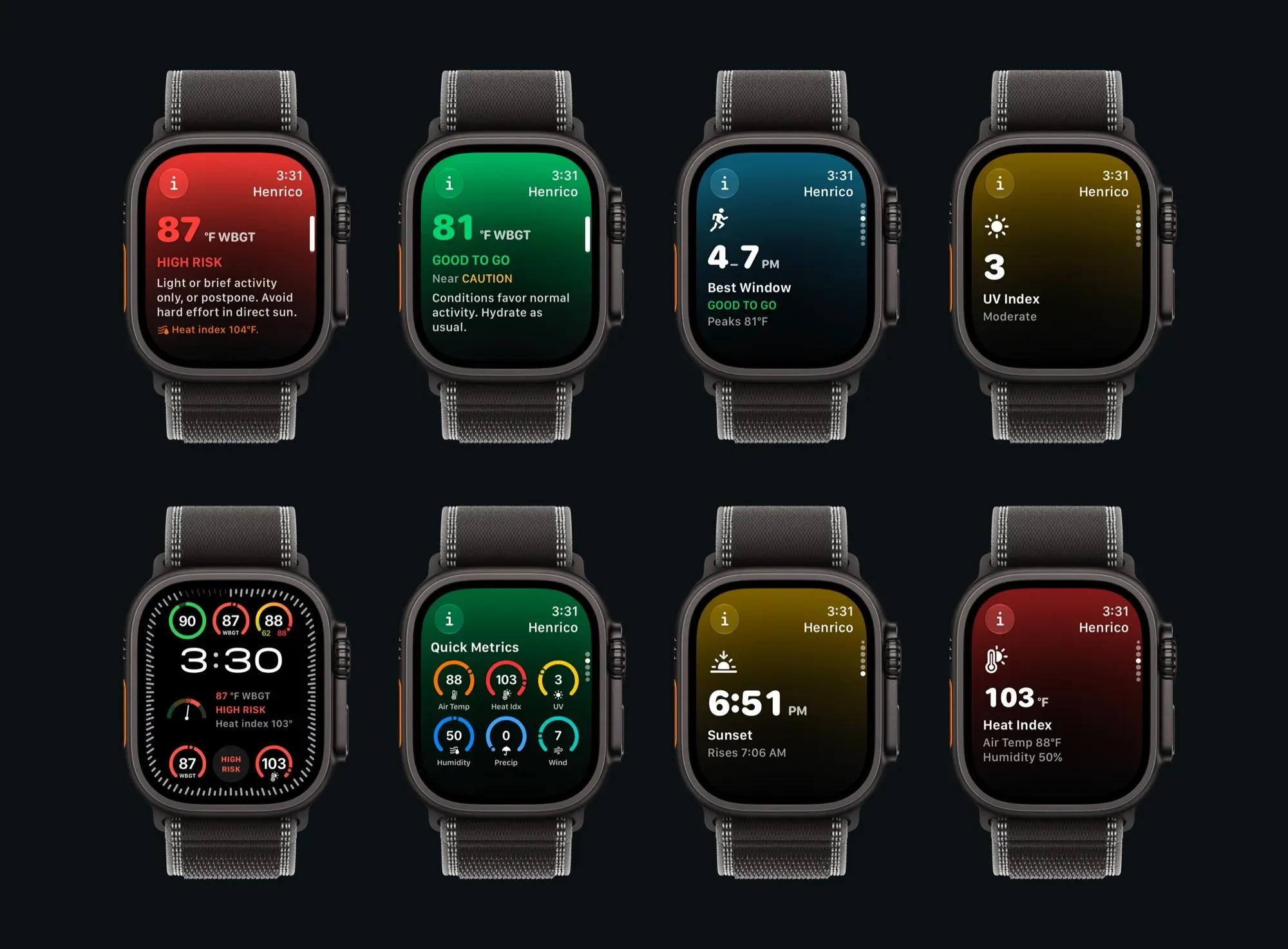
For the last 4 months I’ve been building Swelter. It is an iOS app that shows heat safety (wet bulb temperature and WBGT) and other useful weather metrics for athletes. The wet bulb globe temperature was designed to measure how long humans can exert themselves outdoors in hot and sunny conditions before heat stress accumulates. Swelter uses Apple Weather data to estimate these readings; the app also provides a number of other useful metrics for athletes who spend time outdoors including: UV Index, precipitation, sunrise/sunset, 10 day forecasts, notifications & alerts, widgets, and a design built to make it easy to find the best window for long outdoor cardio & training sessions.
I just shipped version 1.6.0 which brings support for Apple Watch. You can now install Swelter to your watch, including adding complications to your watch faces, and a widget for the Smart Stack. You can check WBGT (heat risk), the heat index, feels-like temperature, UV index, precipitation, sunrise/sunset, and more at a glance.
The Apple Watch version of Swelter is not just a mirror of your phone. The app actually includes a full port of the physics engine that the app runs on, and it makes API calls to Apple Weather directly, so the app (after initial sync/setup) can run entirely independent of your phone. It uses GPS location, requests data from Apple Weather, and then runs the physics calculations necessary to estimate WBGT (heat risk) from your current forecast.
Technical Notes
In this update I also fixed a long standing annoyance I had with the app. In order to ensure data remains current (after 6 hours, or past midnight) I previously had all of the widgets set to go “stale” and show an “Open Swelter to Update” state. I managed to resolve this (while maintaining up-to-date forecast data) by allowing every widget (and watchOS complications) to actually call the Apple Weather API directly if needed. This means you can now add widgets, and when you wake up in the morning they will be up to date (rather than requiring you to open the app in the morning). Note: After 72 hours, you will need to open Swelter at least once to keep the timelines refreshing.
I already have a system in the app that uses the iOS background processing (BGAppRefreshTask) to wake the app multiple times per day to download and cache WeatherKit data (and build local notifications, and update widgets). Using this new system (widgets and watchOS complications both allow minimal background updates using TimelineProvider.getTimeline()) the “peripherals” (widgets and complications) can now update in the background independent of the existing BGTask system. This should ensure that any way you access Swelter, the data will remain up to date.
When building widgets, watch face complications, and background processing features, you must architect and design around strict system limitations (enforced for good reason to ensure efficient memory and battery usage across all apps). I believe with Swelter I’ve achieved a good balance. The app opens and updates frequently enough to stay up-to-date and useful, and works within the bounds of the operating system design constraints. If you want the “V8 Engine” version of Swelter, the iOS app version itself provides all the bells and whistles.
This was a fun project, and it’s satisfying to have an app I built running on my Apple Watch for the first time ever! Thanks for reading, and feel free to check out Swelter via the links below. If you have feedback, ideas, or you run into any issues, you can use the Contact button in the app.
Cheers!
— Gavin, developer of Swelter
Links
Download Swelter on the App Store.
Read the full announcement, WBGT & Wet Bulb Temperature App for Apple Watch, on the RBRN Labs site, my indie app studio.
Swelter is a product of RBRN Labs LLC, and the Swelter name is a trademark of RBRN Labs LLC. Some features in Swelter require a Pro subscription, which auto-renews until cancelled in the App Store subscriptions manager. Apple Watch is a trademark of Apple Inc. Weather data from Apple Weather.